| | |
CSS on body:
CSS on body:
Body refers to the HTML body that holds all the elements we design in the webpage. CSS designs the body element with the help of following properties:
| Property | Value | Description |
|---|---|---|
| background-color | Red; / #ff0000; / rgb(255,0,0); | Colors the background |
| background-image | url("paper.gif"); | Puts a background image |
| background-repeat | repeat-x; | Repeats the image horizontally |
| repeat-y; | Repeats the image Vertically | |
| repeat-xy; | Repeats the image entirely | |
| no-repeat; | Does not repeat the image | |
| background-attachment | fixed; | Background does not scroll |
| scroll; | Background scrolls | |
| background-position | top; / left; / bottom; / right; | Position of the background image |
background-color
body
{
  background-color:#ff00ff;
}

background-image
body
{
  background-image:url('scene.jpg');
}

background-repeat:no-repeat;
body
{
  background-image:url('toy.jpg');
  background-repeat:no-repeat;
}
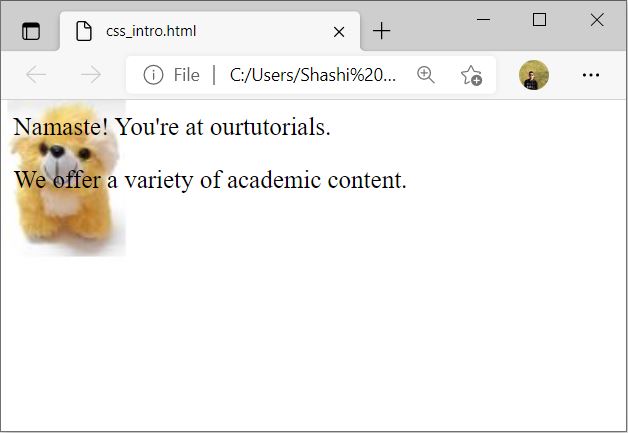
background-repeat:repeat-x;
body
{
  background-image:url('toy.jpg');
  background-repeat:repeat-x;
}

background-repeat:repeat-y;
body
{
  background-image:url('toy.jpg');
  background-repeat:repeat-y;
}

background-repeat:repeat-xy;
body
{
  background-image:url('toy.jpg');
  background-repeat:repeat-xy;
}

background-position:top;
body
{
  background-image:url('toy.jpg');
  background-repeat:no-repeat;
  background-position:top;
}

background-position:right;
body
{
  background-image:url('toy.jpg');
  background-repeat:no-repeat;
  background-position:right;
}

background-position:bottom;
body
{
  background-image:url('toy.jpg');
  background-repeat:no-repeat;
  background-position:bottom;
}

background-position:left;
body
{
  background-image:url('toy.jpg');
  background-repeat:no-repeat;
  background-position:left;
}

background-attachment:fixed;
body
{
  background-image:url('toy.jpg');
  background-repeat:no-repeat;
  background-attachment:fixed;
}
background-attachment:scroll;
body
{
  background-image:url('toy.jpg');
  background-repeat:no-repeat;
  background-attachment:scroll;
}